Drop an image here
JPG, PNG or WebP · up to 25 MB
Content Credentials
—
AI-related metadata
—
Image metadata
—
File structure
—
What does this mean?
Analyze the pixels with a local AI model
Useful when C2PA or metadata were removed by JPG/WebP conversion. This is a probabilistic visual indicator, not a digital signature.
The first run downloads the open model/runtime to your browser (the q8 model is about 87 MB). The selected image is analyzed on-device; PixelSmithery does not upload it for inference.
AI-like score
—Aggregated model score across AI/synthetic classes from pixel patterns; not a calibrated probability or provenance proof.
Closest learned AI class
——
Runtime
—Inference runs in this browser using WebGPU when available, with WebAssembly fallback.
Local AI analysis can make mistakes, especially after heavy compression, editing, screenshots or with generators outside its training data. Use provenance signals as stronger evidence whenever available.
View technical details
Matched signals
Alpha note: C2PA container structures are detected locally but cryptographic signature validation is not yet performed. Visual AI analysis is a separate probabilistic layer.
How this check works
Confirm the real image container and basic integrity.
Inspect EXIF, XMP, text chunks and software traces.
Look for supported C2PA structures and AI-related provenance terms.
Run a free local classification model when embedded provenance has been removed.
This tool provides technical indicators, not a forensic, legal or authorship certificate. Visual AI classification can be wrong, and no supported signal found does not prove human creation.
FROM THE FORGE
Check AI-related image signals directly in your browser
PixelSmithery AI Image Checker is designed to help you inspect images for technical and visual signals associated with AI-generated content. The tool checks supported Content Credentials, C2PA structures, image metadata and file information, with an optional local AI visual analysis when additional evidence is useful.
No single detection method can provide absolute certainty in every case. Metadata and provenance information can disappear when an image is edited, exported, converted or shared, while visual AI detection remains probabilistic. PixelSmithery therefore keeps technical provenance evidence separate from visual analysis and shows what was actually detected.
How to check an image for AI-related signals
Add a JPG, JPEG, PNG or WebP image to the checker above and start the analysis. If your source file is HEIC or HEIF, you can first create a compatible JPG or PNG copy with the HEIC to JPG & PNG Converter. PixelSmithery first inspects the file for supported provenance structures, metadata and known AI-related technical traces. You can then run the optional local AI analysis to examine visual patterns in the image pixels.
The result distinguishes stronger provenance evidence from indicative visual signals, helping you understand whether the finding comes from information stored in the file or from an AI model analysing the image itself.
What can the AI Image Checker detect?
The checker can identify supported Content Credentials and C2PA structures, readable image metadata, AI-related creation terms and information about the image container. When these signals are present, they can provide stronger evidence about how an image was created or processed.
If those technical traces are missing, the optional local visual model can provide an additional AI-like signal. This can be useful after JPG or WebP conversion, editing or exporting has removed metadata, but visual analysis should be treated as an indicator rather than proof of authorship.Need to convert an image before or after checking it?
Private browser-based AI image analysis
PixelSmithery performs the current image inspection and optional visual AI analysis directly in your browser. Your selected image does not need to be uploaded to PixelSmithery for inference, and the tool does not require a paid API key or a per-image processing fee.
The first visual analysis may need to download the required open model and browser runtime. After these resources are cached by your browser, later checks may start faster while the image analysis continues to run on your device.
FROM THE FORGE
How AI image detection and provenance checks work together
An AI image detector can examine visual patterns in an image, but visual analysis alone cannot establish how a file was created. PixelSmithery therefore combines several types of evidence. The checker first looks for supported provenance information, Content Credentials, C2PA structures and readable metadata before offering optional local analysis of the image pixels.
Provenance information can provide stronger technical evidence because it may contain data about the origin or processing history of a file. However, this information is not always available. Exporting an image, taking a screenshot, editing it or converting it to another format can remove metadata and provenance structures even when the visible image remains almost unchanged.
When those signals are missing, the optional local AI image detector provides a second layer of analysis. It examines learned visual characteristics and reports an AI-like score. This can help identify patterns associated with AI-generated images, including files that have been converted to JPG or WebP, but the result remains probabilistic and should not be treated as proof of authorship.
Using both approaches gives a more informative result than relying on a single AI generated image detector score. PixelSmithery keeps provenance evidence and visual classification separate so you can see which type of signal produced each finding.
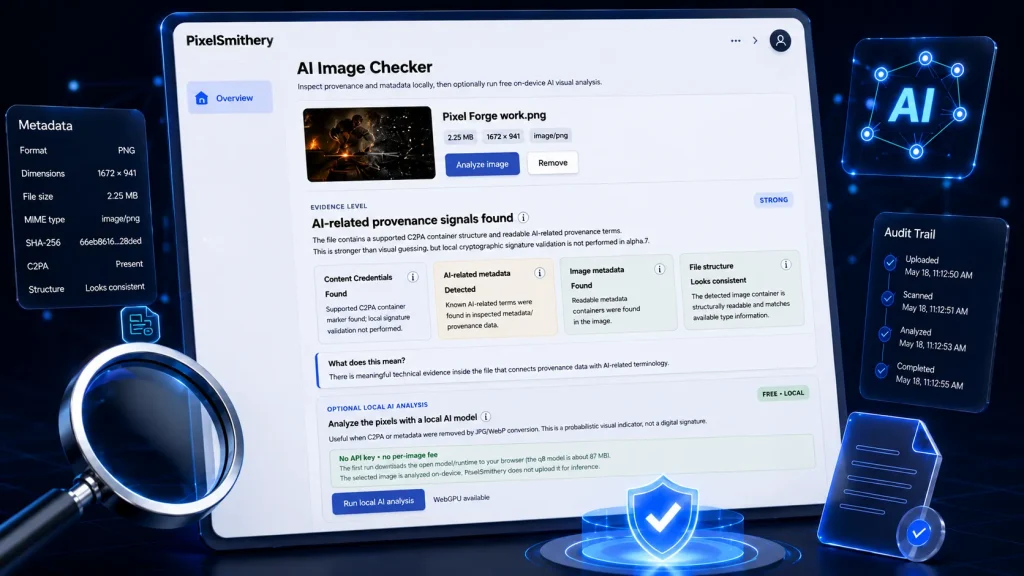
metadata inspection and optional local AI analysis in the browser.
AI Image Checker FAQ
Is PixelSmithery AI Image Checker free?
Yes. PixelSmithery AI Image Checker is free to use. The current version does not require an API key, account or per-image processing fee. Base inspection and optional AI visual analysis run directly in your browser.
Does PixelSmithery upload my image?
No. Your selected image stays on your device during the current analysis process. Provenance inspection, metadata checks and optional AI visual analysis are performed locally in your browser rather than uploading the image to PixelSmithery for inference.
Can the AI Image Checker detect AI images without metadata?
It can still provide useful indicators. If Content Credentials, C2PA data or other metadata have been removed, the optional local AI model can analyze visual patterns in the image pixels. This result is probabilistic and should be treated as an indicator rather than verified proof that an image was AI-generated.
Can AI detection still work after JPG or WebP conversion?
Sometimes. Re-encoding an image can remove metadata and provenance information. For example, converting a PNG with the PNG to JPG Converter or preparing a JPG or PNG image with the JPG & PNG to WebP Converter may remove some technical signals. The same caution applies when using the WebP to JPG/PNG Converter to create a new copy from a WebP file. PixelSmithery can still optionally analyze the remaining visual patterns in the converted image, but that result remains probabilistic.
Does a high AI-like score prove that an image is AI-generated?
No. The AI-like score reflects how strongly the local visual model associates the image with learned AI or synthetic image patterns. It is not a calibrated probability, digital signature or proof of authorship. Supported provenance signals should be considered stronger evidence when they are available.
What are Content Credentials and C2PA?
Content Credentials can contain information about how digital content was created or modified. C2PA is a technical standard used to attach and verify this type of provenance information. When supported AI-related provenance data is present, PixelSmithery treats it as stronger evidence than visual classification alone.