WebP to JPG/PNG converter
Convert WebP images to JPG or PNG directly in your browser.
FROM THE FORGE
Convert WebP images to JPG or PNG directly in your browser
PixelSmithery WebP to JPG/PNG Converter turns WebP images into widely compatible JPG or PNG files directly in your browser. Choose JPG when you need a smaller photographic file or PNG when transparency and lossless output are more important.
The conversion happens locally on your device, so your images do not need to be uploaded to PixelSmithery for processing. You can select the output format, adjust JPG quality when needed and convert WebP files quickly while keeping control of your images.
WebP is designed for efficient web delivery, but some applications, editing tools and older workflows still work more reliably with JPG or PNG files. Converting WebP to a more widely supported format can make images easier to edit, share or reuse without depending on additional software.
The choice between JPG and PNG depends on the image itself. JPG is generally better suited to photographs and situations where a smaller file is preferred, while PNG is useful for graphics, screenshots and images that require transparency. PixelSmithery lets you choose the appropriate output instead of forcing every WebP image into a single format. This makes the converter useful for everyday workflows where compatibility matters more than keeping the original WebP format.
How to convert WebP to JPG or PNG
Add one or more WebP images to the converter above. Choose JPG or PNG as the output format, adjust JPG quality if required and start the conversion. When processing is complete, download the converted images directly to your device.
JPG is usually the better choice for photographs and smaller file sizes, while PNG is useful when you need transparency or a lossless image format. Need another format conversion? If your source image is PNG rather than WebP and you only need a JPG output, use the PNG to JPG Converter instead.
When should you convert WebP to JPG?
Converting WebP to JPG can be useful when an application, website or workflow does not support WebP files. JPG remains one of the most widely supported image formats and is well suited to photographs, product images and other continuous-tone graphics.
Because JPG uses lossy compression, the converter lets you control output quality so you can balance image appearance and file size. Need the reverse process? If you later need to optimize the JPG or PNG result for the web, you can convert it to WebP with the JPG & PNG to WebP Converter.
When should you convert WebP to PNG?
PNG is a better option when you need transparency, lossless image data or compatibility with software that expects PNG files. Converting WebP to PNG can also be useful for graphics, interface assets, screenshots and images that may need further editing.
PNG files can be larger than JPG files, especially for photographic images, so the best output format depends on how you plan to use the converted image.
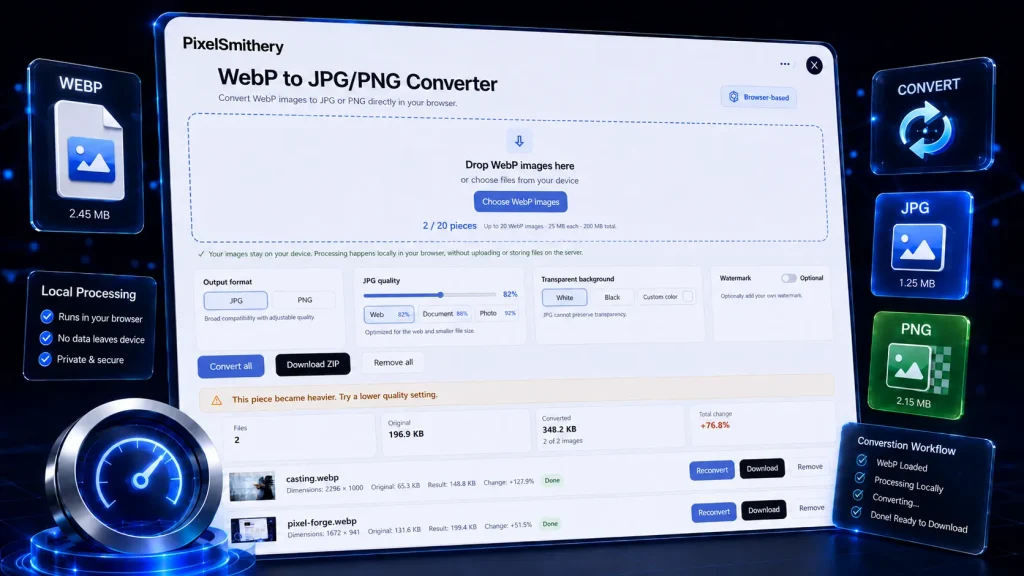
highlighting local browser-based conversion, JPG/PNG output options and private processing.
If you want to inspect provenance or AI-related signals before or after conversion, try the AI Image Checker. You can also explore more browser-based image tools from PixelSmithery.
WebP to JPG/PNG Converter FAQ
Is the WebP to JPG/PNG Converter free?
Yes. PixelSmithery WebP to JPG/PNG Converter is free to use and processes images directly in your browser.
Does PixelSmithery upload my WebP images?
No. The current conversion process runs locally in your browser, so your selected images do not need to be uploaded to PixelSmithery for processing.
Should I convert WebP to JPG or PNG?
Choose JPG for photographs and smaller file sizes. Choose PNG when you need transparency, lossless output or a format better suited to graphics and further editing.
Does converting WebP to JPG reduce image quality?
JPG uses lossy compression, so some image data can be discarded during conversion. PixelSmithery lets you adjust JPG quality to balance visual quality and file size.
Does WebP to PNG preserve transparency?
If the source WebP contains transparency, PNG is the appropriate output format for preserving an alpha channel.
Which WebP files can I convert?
The current converter accepts WebP images and provides JPG or PNG output directly in the browser, subject to the tool’s built-in browser safety limits.